_edited.png)
How To Play
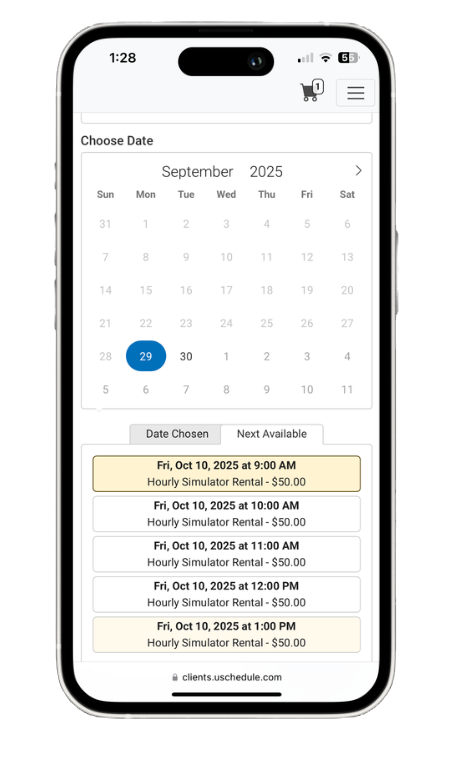
Choose a Day & Time
Follow the link to our booking page to view the calendar and select from the available dates and times for our simulator. You can book last minute or up to 1 week in advance with minimum bookings of 1 Hour.

Enter Booking & Payment Details
Follow the instructions to enter your details. If it’s your first time booking, you will need to make an account . Please ensure all information is accurate. Most of this info is only needed once, future bookings will be a breeze!
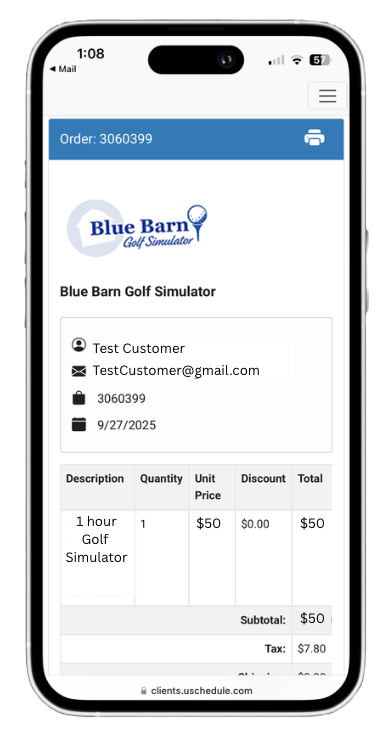
Review Booking Confirmation
Upon completion, you will receive a confirmation email to let you know your booking was successful. Please review the details to make sure all information is correct. Please refer to our cancellations policy and email if you wish to reschedule/ cancel.
Entering the Facility
Digital Access Key

Upon successful booking you will receive an email containing a Digital Access Key valid for your booking. Only guests with a booked time will be permitted inside the facility.

Arrive and Unlock
Our simulator is located at the back of the Blue Barn. Once you arrive at the door, open your email to use your Digital Access Key code to gain access to the building. Please make sure the door closes behind you.
Practice & Play

Using the Simulator
Once you arrive , Take a moment to view our guides and info we have provided. Follow the instructional materials to access our wide variety of options with our top notch software. Please remember to bring your own clubs.

During Game Play
Please be respectful of the space. No alcohol, no smoking/vaping. Prepackaged snacks and drinks are available for purchase. Please keep the Facility clean. Anybody seen not following facility rules will have their bookings cancelled.

End of Booking
At Blue Barn Golf Simulator, our priority is to ensure a great experience for all of our guests. As you wrap up your booking, we kindly request that you help us keep our facility in tip-top shape and clear out of the simulator promptly for the next group to come in.
Swing by the Barn
Located at the back of Blue Barn Furnishings
.png)
Swing by the Barn
Located Behind Blue Barn Furnishings
4929 ON-3, Cayuga, ON N0A 1E0
905-772-5382
Open 7 Days A Week , 7am - 12am
Stay Connected


© 2025 Blue Barn Golf Simulator